


Jeep®
4.73.38K Reviews
App Specs
- Version
- 1.99.704
- Updated On
- License
- Free
- Downloads
- 500,000+
- Developer
- FCA US LLC
- Categories
- Lifestyle
- Platform
- Android, iOS
Screenshots
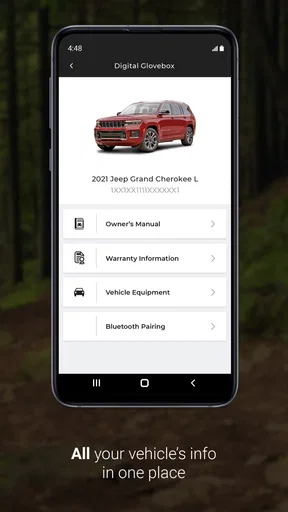
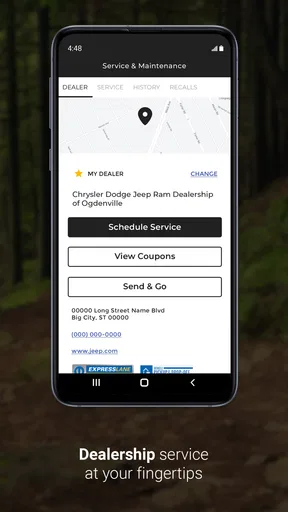
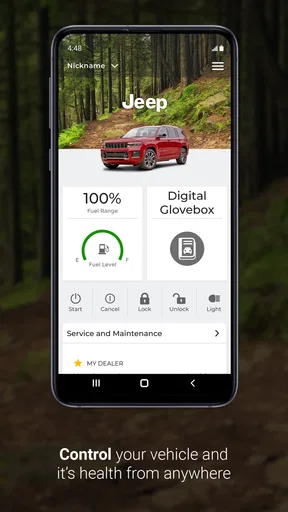
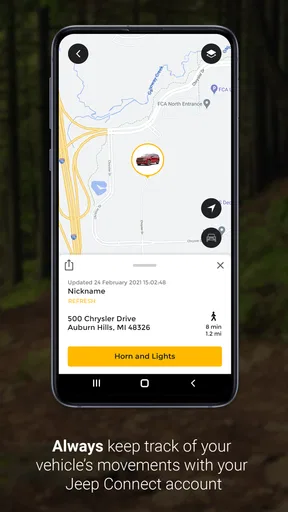
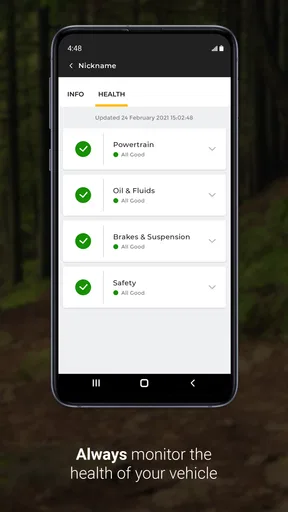
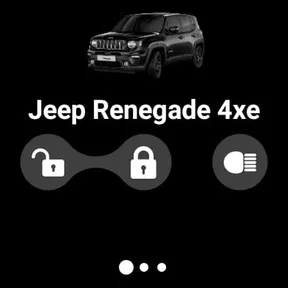
 Analysis by AppCompare
When I look at a vehicle companion app, I am not only asking whether it can display useful information. I want to know whether I can understand it quickly, operate it without unnecessary effort, and still get value from it when I am tired, distracted, travelling, or dealing with a practical problem around my vehicle. Jeep® is aimed at that everyday ownership space rather than entertainment. It is a free lifestyle app from FCA US LLC, designed for people who own or use a Jeep vehicle and want a digital doorway into ownership information and support.
My overall impression is that the app makes the most sense as a companion to the vehicle, not as a replacement for every other tool a driver may use. It can help organize the ownership experience, but its usefulness depends on how well its information matches your vehicle and how comfortable you are navigating a phone screen. The app is rated 4.7 on average from around 18K ratings, which suggests that many users find its core purpose worthwhile, while the broader review count of about 3.4K shows there is also a substantial amount of written feedback to consider.
How Jeep® works for different owners and situations
I find the app’s value depends less on how often I open it than on whether I can reach the right vehicle guidance before a small question turns into a stressful one. For owners with different habits, access needs, or levels of smartphone confidence, I’d first decide which tasks are worth keeping in a digital routine. That makes it easier to judge where the app fits—and where a manual or another person is the better support.
Readable navigation is more important than a crowded feature list
The first thing I notice with an owner-focused app is whether it helps me reach the answer I need without making me remember where the information lives. Jeep® benefits from having a clear ownership purpose: I am opening it for vehicle-related guidance, not browsing an endless lifestyle feed. That narrower focus can make the experience less mentally demanding than searching through general web pages, dealership sites, or a vehicle manual saved somewhere on my phone.
For a new owner, the most useful approach is to treat the app as a reference point. I would spend a few minutes identifying where the vehicle information, guidance, and ownership resources are located before I actually need them. That small preparation matters because an app feels much less accessible when the first use happens beside a roadside problem or during a rushed departure.
Text-heavy ownership information can be helpful for people who prefer reading at their own pace. I can pause, revisit a section, and compare instructions with what I see in the vehicle. That is often easier than trying to remember something explained verbally at a dealership. At the same time, phone-based reading is not automatically comfortable for everyone. Small text, dense screens, low contrast, or long passages can create friction for people with reduced vision, dyslexia, attention difficulties, or fatigue.
I would therefore use the phone’s own display settings where available, such as enlarging text or increasing contrast, but I would not assume that every screen will respond perfectly. Enlarged system text can sometimes cause wrapping or make a page require more scrolling. The practical test is simple: open the app in a calm moment and check whether you can read the important information without leaning toward the screen or repeatedly zooming.
Worth Reading Before You Choose

EA SPORTS FC Mobile 26 Is a Bigger Football Game, but It Takes Time

Flipboard Shows What News Apps Must Do Beyond the Feed

Switching to Android Auto Means Rethinking Your Driving Routine

Google Calendar Makes a Crowded Week Easier to Manage

Ludo King Makes the Most of the Minutes Between Plans

Baby Panda World Brings Quick Play to Modern Phones, but Its Game Library Feels Busy
The strongest accessibility choice is preparation rather than speed: learn the layout while parked, save the information you commonly need in a place you can reach later, and avoid trying to explore the app while driving. This is especially useful for users who need more time to process instructions or who find switching between screens tiring.
Motor and sensory demands during ordinary use
Using an owner app usually involves tapping, scrolling, reading, and sometimes entering vehicle or account details. Those actions may be straightforward for many people, but they can be difficult for users with tremors, limited dexterity, joint pain, one-handed use, or difficulty maintaining a precise touch target. I found that the app is best approached as a stationary tool. A stable surface and two-handed use, when comfortable, make setup and navigation less frustrating than trying to operate it while holding bags, standing outdoors, or sitting in a moving vehicle.
That distinction is important. An app can be useful for vehicle ownership and still be poorly suited to quick interaction behind the wheel. I would never rely on it for a task that requires attention away from traffic. Even passengers should be cautious if the vehicle is moving, because reading instructions or entering information can still divide attention.
For users with sensory sensitivities, the main consideration is not only visual design but also the context in which the app is used. A bright screen in a dark garage may be uncomfortable, while sunlight can make ordinary text harder to see. Notifications, loading delays, or changing screens may also be irritating for people who prefer predictable feedback. I recommend adjusting the phone before opening the app: set a comfortable brightness, enable a preferred display mode, and use a quiet environment for the first setup.
People who use screen readers or other assistive technologies should test the most important paths rather than assuming that every control will be equally well labeled. The app’s purpose is clear, but a vehicle companion still needs to expose buttons, headings, and status information in a logical order for assistive software. If a critical action is difficult to identify by voice or keyboard navigation, the app becomes less practical even when the underlying information is useful.
There is also a cognitive side to accessibility. Vehicle terminology can be unfamiliar to first-time owners, and instructions may assume that the reader already knows where a control is located. I prefer to keep the physical vehicle manual nearby during the first few sessions. When the wording in the app and the labels inside the vehicle are easy to match, the digital guidance feels much more approachable.
Situational access: where the app earns its place
The most realistic use case for me is a quiet moment before a trip. I might be preparing to drive somewhere unfamiliar, checking ownership information, or trying to understand a vehicle-specific instruction without searching the wider internet. In that situation, a dedicated app is more convenient than opening several browser tabs and guessing which information applies to my Jeep.
Another useful scenario is handing the phone to a passenger who can read or navigate while I remain focused on driving. This can help households where one person has more difficulty with small text, touch controls, or remembering technical terms. The passenger can take over the searching while the driver handles the vehicle. That is a simple but meaningful way to make the ownership experience more inclusive without asking the driver to multitask.
The app can also be helpful for owners who prefer digital organization. Rather than keeping every piece of vehicle information in paper form, I can use the phone as a central reference. That is particularly convenient when moving between home, work, and travel. However, I would not treat the app as the only source of information in every circumstance. A dead phone battery, weak connection, damaged device, or stressful roadside situation can quickly turn a digital-first workflow into a problem.
For older drivers, the value may depend on confidence more than technical ability. Someone who already uses a smartphone comfortably may appreciate having vehicle information in a familiar device. Someone who dislikes app accounts, scrolling, or changing interfaces may prefer a printed manual and direct human assistance. In that case, the app should be an optional supplement rather than a requirement imposed on the owner.
People with hearing loss may find written vehicle information more convenient than relying on an audio explanation from another person. People with limited vision may prefer spoken assistance or a larger physical manual, depending on how well the app works with their phone’s accessibility settings. Users with memory difficulties may benefit from revisiting instructions, but they may also need a simpler path with fewer choices. These differences are why I would judge the app by the exact task I need to complete, not by the general promise of having a vehicle app.
Where it compares well with ordinary alternatives
The usual alternatives are the printed owner’s manual, a general web search, a dealership conversation, or asking another Jeep owner. Each has a place. A printed manual is dependable when the phone is unavailable and can be easier to browse for someone who dislikes touchscreens. A web search is faster for broad questions, but it can return advice for a different model or year. A dealership can explain complicated issues personally, although that is not always convenient when I only need to check a basic ownership detail.
Jeep® sits between those options. Its advantage is the combination of a familiar phone interface and a vehicle-specific purpose. I do not have to carry a thick manual everywhere, and I am less likely to rely on a random forum answer. The trade-off is that the phone introduces its own barriers: setup, screen readability, navigation, battery life, and the possibility that digital information will not feel as immediate as a page with a physical index.
I would choose the app over a general search when I want information connected to Jeep ownership and do not want to sort through unrelated results. I would choose the manual when I am in a place with poor phone access or when I need a stable reference that another person can read beside me. I would choose a dealer or qualified professional when the issue involves safety, a warning that persists, or a repair decision that should not be based on an app screen alone.
Practical workflows that reduce friction
One useful habit is to test the app before a long journey rather than downloading it at the moment something goes wrong. Open it at home, sign in or complete any vehicle setup it requests, and identify the sections that relate to your ownership needs. This gives users with slower reading, motor, or processing speed the time they need without pressure.
A second habit is to create a personal backup routine. If the app contains information I expect to need on a trip, I would note the relevant section or keep the physical manual available. I would not depend on memory alone, and I would not assume that the app can replace roadside assistance or professional diagnosis. Digital convenience works best when it is part of a backup plan rather than the entire plan.
A third insight is to separate learning from action. I can read and understand vehicle guidance while parked, then carry out the physical task later without repeatedly looking down at the phone. This is safer and also more accessible for people who need to concentrate on hand movements or interpret instructions one step at a time.
Finally, I would let the person who is most comfortable with the phone handle setup, but I would still make sure the actual driver understands where essential information is located. That avoids creating a single point of dependence in a household. If only one family member knows how the app works, the convenience disappears when that person is unavailable.
Remaining barriers that may affect the decision
The app is not automatically inclusive simply because it is digital. Its usefulness can be reduced by small text, complicated account steps, unclear labels, or a layout that requires too much scrolling. These issues matter more for someone with low vision, limited dexterity, cognitive fatigue, or limited experience with smartphone apps. I would test the exact screens I need and judge them honestly rather than assuming that a high overall rating means every user will have the same experience.
There is also a difference between having information available and making it actionable. A long explanation may be accurate but still difficult to use when I am standing outside the vehicle in bad weather. A user who needs plain language, visual confirmation, or support from another person may find the app helpful for preparation but less helpful during a time-sensitive problem.
People who want a universal vehicle-management tool may also find the focused nature of Jeep® limiting. It is designed around Jeep ownership, so it is not the right choice for someone managing several unrelated vehicle brands from one place. A general notes app, a printed folder, or a broader automotive service may be more convenient for a mixed household, even though those options may lack the Jeep-specific context.
Compatibility deserves attention as well. The app requires an operating system version of 9 or later, so anyone using an older phone should check the device before planning around it. The current version is 1.99.704, and keeping software current is sensible for reliability, but updates can also change navigation and visual details. For users who depend on a familiar routine, a changed layout may require another short learning period.
The age rating is Everyone, which fits the app’s practical ownership purpose. That does not mean every feature will feel equally easy for every age group or ability level. A child, older adult, or person unfamiliar with vehicle terminology may still need another person to explain what the information means. The rating describes general suitability, not a guarantee of effortless independent use.
Who should use it, and who should skip it?
I would recommend Jeep® to a Jeep owner who wants a dedicated digital reference and already feels reasonably comfortable using a smartphone. It is particularly worthwhile for people who travel, share vehicle responsibilities, prefer written guidance, or want to reduce dependence on broad web searches. The free price removes an obvious barrier, and the app has reached over 500K installs, so it is clearly being used as more than a niche experiment.
I would be more cautious recommending it as the only ownership resource to someone with unreliable phone access, an older unsupported device, severe difficulty reading touchscreen text, or a strong preference for paper instructions. I would also skip it if my main goal were to manage vehicles from several manufacturers in one unified app. In those cases, the traditional manual, a trusted service contact, or a broader tool may fit better.
For accessibility, my recommendation is conditional but positive: use it as a prepared, parked, adjustable reference, and involve a passenger or support person when that makes navigation easier. Do not judge it only by whether it opens successfully. Judge whether you can find the information, read it comfortably, and act on it without rushing.
My inclusive verdict after living with the idea of daily use
Jeep® does a good job of giving Jeep owners a focused digital place to begin. I like it most when I am planning ahead, checking ownership guidance, or trying to avoid the uncertainty of a generic internet search. Its greatest strength is not flashy technology; it is the possibility of putting vehicle-specific information in a familiar device that I can revisit when I need it.
Its limitations are equally practical. A phone screen is not comfortable for everyone, digital access can fail at inconvenient times, and an app cannot replace professional help for serious vehicle problems. Users with different abilities may need display adjustments, a passenger, a printed backup, or extra time. Those are not reasons to dismiss the app, but they are reasons to use it thoughtfully.
As a free lifestyle app for Jeep owners, it is a sensible addition to an ownership routine rather than a complete solution to every vehicle question. I would install it, set it up while parked, explore it with my preferred accessibility settings, and keep a non-digital backup nearby. For me, the best reason to use Jeep® is controlled convenience: useful information when I want it, without pretending that one app can serve every driver or every situation equally well.
Pros
- Official Jeep branding and recognizable vehicle imagery
- Simple interface that is easy to navigate
- Useful content for Jeep enthusiasts and owners
- Supports quick access to Jeep-related information
- Available for users interested in the Jeep lifestyle
Cons
- Some features may require an internet connection
- Content may focus mainly on newer Jeep models
- Limited usefulness for owners of other vehicle brands
- Personalized features may require account registration
- Availability of features can vary by region or device
FAQs for Jeep®
What is the Jeep® app used for?
The Jeep® app is designed to help Jeep owners and enthusiasts stay connected with their vehicle and the brand. Depending on the model and region, it may provide vehicle information, maintenance reminders, roadside assistance, dealership tools, owner resources, connected services, and access to Jeep news or offers. Available features can vary by vehicle, subscription, and location.
Is the Jeep® app compatible with every Jeep vehicle?
Not necessarily. Compatibility depends on the Jeep model, model year, trim level, installed Uconnect® or connected-vehicle system, and the country where the vehicle is registered. Some features may work only with newer vehicles or specific connected-service packages. Before downloading, check the app listing and confirm that your vehicle and mobile device meet the current compatibility requirements.
Does the Jeep® app require a subscription or additional payment?
The Jeep® app can usually be downloaded at no cost, but certain connected features may require an active trial, paid subscription, or eligible vehicle package. Services such as remote commands, vehicle location, roadside assistance, or live information may not be included permanently. Pricing, trial periods, and available services differ by market, so review the terms shown in the app.
Can I use the Jeep® app to remotely control my vehicle?
On supported vehicles and in eligible regions, the app may allow remote functions such as locking or unlocking the doors, starting the engine, checking vehicle status, or locating the vehicle. These functions require the vehicle to have compatible connected technology, an active account, and reliable mobile coverage. Remote commands may also be limited by safety conditions and local availability.
What should I do if the Jeep® app does not connect or update vehicle information?
First, check that your phone has a stable internet connection, Bluetooth and location permissions are enabled when required, and the app is updated to the latest version. Confirm that you are signed in with the correct account and that your vehicle has network coverage. If the problem continues, restart the app and vehicle system, then contact Jeep customer support or your dealer.


